

The autonomous AI development workspace for Android.
Chat with coding agents, edit project files, run an interactive Linux PTY terminal, and preview live web servers directly on your phone.



Download Online APK · Download Offline APK · Watch Demo · Quickstart · Architecture · Build from Source
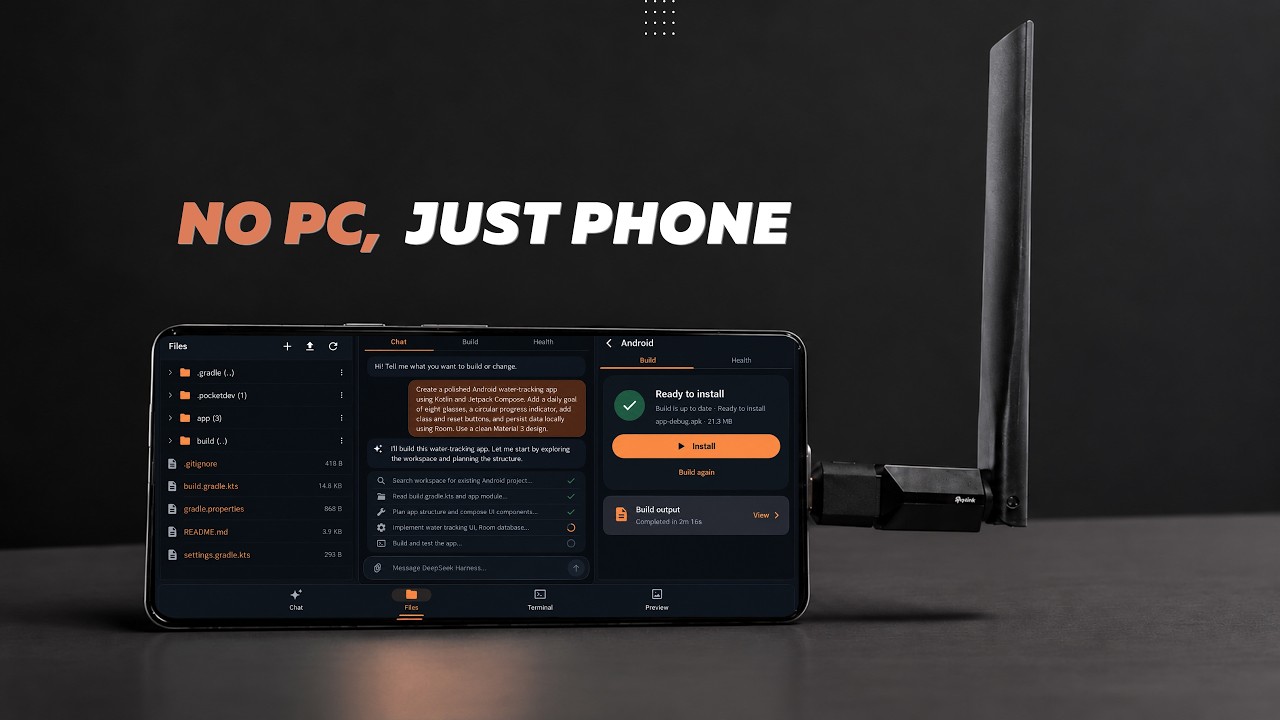
Product walkthrough: provisioning Ubuntu, connecting an agent, and building an app on Android
Important
Environment Security Notice Mobile Harness runs an unprivileged userspace Linux environment via PRoot on ARM64 Android devices. While isolated from other apps by standard Android sandboxing, PRoot is not a kernel-level VM or hardened security jail. Only run repositories and dependencies you trust.
Both editions include the full application and support signed in-app updates:
| Edition | Size | Best For | Download |
|---|---|---|---|
| Online Edition (Recommended) | 89.1 MB | Fast initial install; downloads Core, Python, and Android toolchains on demand | Download Online APK |
| Offline Edition | 889.4 MB | Air-gapped or metered setups; bundles Core, Python, and Android toolchains inside the APK | Download Offline APK |
- Autonomous Multi-Agent Coding: Dedicated, isolated drivers and session persistence for Claude Code, DeepSeek Harness, Antigravity CLI, and OpenCode.
- Embedded Termux PTY Terminal: Full VT100/truecolor interactive shell powered by Termux
terminal-emulatorandterminal-view(v0.118.3) over a 16 KB page-aligned native PTY bridge (libtermux.so), featuring a sticky 2×7 Extra Keys bar, pinch-to-zoom, customizable cursor/font settings, and read-only mini terminals for live setup and build logs. - Rootless Ubuntu LTS Subsystem: Self-contained ARM64 Ubuntu LTS userspace inside PRoot with Git, OpenSSL, GNU coreutils, and Node.js LTS (lazy-loaded NVM) — no root access or external terminal apps required.
- On-Device Android APK Builds: Compile debug APKs directly inside the workspace and pass them straight to Android's package installer without USB or wireless ADB pairing.
- Instant Web Preview: Test local Vite, Next.js, or Express servers inside a sandboxed WebView with console output inspection.
- Native File Workflow & Keystore Security: Browse, edit, search, import, and export files via Android Storage Access Framework (SAF), with API keys encrypted in hardware-backed Android Keystore (AES-256-GCM).
| Projects | Terminal | Settings |
|---|---|---|
 |
 |
 |
- Install the APK: Download either the Online or Offline ARM64 APK from GitHub Releases and install it on an Android 9+ device.
- Complete Guided Setup: Follow the 3-step onboarding flow to grant background execution permissions, provision the Ubuntu LTS runtime and optional toolchains, and configure your AI provider.
- Create a Project & Build: Tap New Project (or Quick Project), describe your task in the workspace chat, and use the Terminal, Files, or Preview tabs alongside the agent.
| 1 · System Readiness | 2 · Toolchains | 3 · AI Provider |
|---|---|---|
 |
 |
 |
| Agent | Authentication | Provisioning | Runtime Isolation |
|---|---|---|---|
| Claude Code | Claude account or API-key providers | On demand / Bundled in Offline | Dedicated bridge, hooks, and settings |
| DeepSeek Harness | API-key providers | On demand | Dedicated DSH bridge and settings |
| Antigravity CLI | Official Google OAuth browser flow | Bundled / version-pinned | Dedicated agy bridge, model, and effort state |
| OpenCode | Free keyless models or API keys | Official v2 installer on demand | Dedicated opencode v2 bridge and session IDs |
Warning
Antigravity tasks currently launch with --dangerously-skip-permissions, allowing the CLI to execute tool calls without individual Mobile Harness approval prompts. Use it only in trusted workspaces. Subject to your account's upstream service quotas.
| Provider | Protocol / Integration | Streaming & Tools | Notes |
|---|---|---|---|
| Anthropic API | Direct Key | Supported | Primary recommended backend |
| OpenCode Zen (CLI) | Official CLI | Supported | Supports both free (keyless) and paid models |
| OpenCode Zen (HTTP) | Gateway | Supported | Paid models via OpenCode Zen HTTP endpoint |
| OpenRouter | Gateway | Supported | Multi-model routing through a single API key |
| DeepSeek | Direct Key | Supported | Anthropic-compatible endpoint |
| Kimi | Direct Key | Supported | Anthropic-compatible Moonshot endpoint |
| NVIDIA NIM | Gateway | Supported | OpenAI-compatible models hosted by NVIDIA |
| Custom API | Endpoint Override | Compatible | User-configured gateway URL |
Note
API keys are encrypted at rest via Android Keystore (AES-256-GCM). Antigravity Google OAuth tokens are managed exclusively by the official agy CLI inside the Linux environment and are never read by the Android host.
Install or remove additional language toolchains anytime from Settings → Development tools:
| Stack | Included Tooling |
|---|---|
| Web (JavaScript / TypeScript) | Node.js LTS, npm, npx, Corepack (via lazy-loaded NVM) |
| Python | Python 3, pip, venv, and native build headers |
| Android (Java / Kotlin) | OpenJDK 17 headless runtime, Android SDK build tools, Gradle |
| C / C++ | gcc, g++, clang, make, cmake, gdb |
| PHP | php-cli, Composer, and standard extensions |
| Godot | Godot 4 ARM64 runtime and MCP integration |
Mobile Harness pairs a Jetpack Compose UI and foreground lifecycle service with two native C/C++ JNI bridges (libpocketspawn.so for non-interactive agent/build pipelines and 16 KB page-aligned libtermux.so for interactive PTY sessions):
flowchart TB
    subgraph Android["Android Host (Kotlin + Jetpack Compose)"]
        UI["UI Layer<br/>Projects · Chat · Termux PTY Terminal · Web Preview"]
        Service["Foreground Runtime Service<br/>Lifecycle & WakeLocks"]
        Keystore["Android Keystore<br/>AES-256-GCM Secrets"]
        JNI["Native C/C++ JNI Bridges<br/>libpocketspawn.so · libtermux.so (16 KB)"]
    end

    subgraph Linux["Isolated Linux Subsystem (PRoot ARM64)"]
        Ubuntu["Ubuntu LTS Rootfs<br/>Rootless Userspace"]
        Agents["Agent Drivers<br/>Claude · DeepSeek · Antigravity · OpenCode"]
        Stacks["Toolchains<br/>Node.js · Git · Python · Android SDK · C++"]
        Files["Project Workspaces<br/>Source Files · Git History"]
    end

    subgraph Cloud["External Endpoints"]
        APIs["Anthropic & Compatible Gateways"]
        Google["Google Antigravity Service"]
    end

    UI <--> Service
    Service <--> JNI
    JNI <--> Linux
    Keystore -.-> UI
    Agents <--> APIs
    Agents <--> Google
    Agents --> Stacks
    Stacks <--> Files
    UI -.-> Files
| Requirement | Minimum | Recommended |
|---|---|---|
| OS | Android 9.0 (API 28) | Android 13.0+ (API 33+) |
| CPU | 64-bit ARM (arm64-v8a) |
8-core ARM64 (Snapdragon 8 Gen 1+ / Dimensity) |
| RAM | 4 GB | 8 GB+ |
| Free Storage | 2.5 GB (Base runtime) | 8.0 GB+ (Multiple stacks & Gradle caches) |
| Network | Required for setup & cloud APIs | High-speed Wi-Fi for initial provisioning |
Building from source
- Android Studio: Hedgehog / Ladybug or newer
- Android SDK:
compileSdk 36 - JDK: JDK 17 (Temurin or OpenJDK)
- Android NDK:
28.2.13676358(16 KB ELF page alignment) - CMake:
3.22.1
git clone https://github.com/techjarves/Mobile-Harness.git
cd Mobile-Harness

# Assemble online debug APK
./gradlew assembleOnlineDebug

# Install on a connected ARM64 device
adb install -r app/build/outputs/apk/online/debug/app-online-debug.apk

# Run unit tests and Android Lint
./gradlew testOnlineDebugUnitTest lintOnlineDebug- Sideload APK (Default): Uses
targetSdk = 28(untrusted_app_27SELinux domain) so unpacked PRoot ELF binaries execute directly from the Linux page cache on Android 10–14+. - Google Play Compliance Build:
See docs/PLAY_STORE_CHECKLIST.md for Play policy requirements.
./gradlew -PplayBuild=true assembleOnlineDebug
Repository structure
Mobile-Harness/
├── app/src/main/
│   ├── cpp/                    # Native spawner (pocket_spawn.c) & 16KB PTY (termux.c)
│   ├── java/com/jarves/mh/
│   │   ├── data/               # AppPreferences, Android Keystore AES encryption, JSON storage
│   │   ├── model/              # Projects, chats, files, providers, and runtime events
│   │   ├── runtime/            # PRoot installer, agent bridges, foreground services
│   │   │   └── terminal/       # ManagedTerminalSession & ReadOnlyTerminalSession
│   │   └── ui/                 # Jetpack Compose screens, TerminalScreen, ReadOnlyMiniTerminal
│   ├── assets/                 # Checksums, base configurations, third-party licenses
│   └── res/                    # Drawables, icons, and string resources
├── docs/                       # Architecture plans, Play Store checklist, and backlog
└── fastlane/                   # Store metadata and release assets
Security & privacy model
- Direct Connections: Prompts and source code are sent directly from your device to your configured AI provider with no intermediary proxy or telemetry server.
- Scoped Storage: Imports and exports rely on Android's Storage Access Framework (SAF) rather than broad filesystem permissions.
- Checksum Verification: Downloaded rootfs archives and CLI binaries are verified against SHA-256 digests before extraction.
- Hardware-Backed Secrets: API credentials are encrypted using Android Keystore AES-256-GCM.
Read the full Privacy Policy.
- Hardware & OS: Supports
arm64-v8aAndroid devices only; kernel-level features such as Docker, KVM,systemd, and nested hardware emulators are unavailable under PRoot. - Process Sandboxing: PRoot translates filesystem paths and UIDs in user space and is not a cryptographically isolated container.
- Background Throttling: Aggressive OEM battery savers may throttle long builds unless Mobile Harness is exempted from battery optimization.
- Gradle Dependencies: First-time Android project builds may download external Maven artifacts if not already cached.
- Mobile Harness is an independent open-source project and is not affiliated with, endorsed by, or sponsored by Anthropic.
- Claude and Claude Code are trademarks of Anthropic, PBC. Ubuntu, Android, Kotlin, Node.js, Git, and Termux belong to their respective owners.
- Third-party licenses are bundled in
app/src/main/assets/licenses. - Licensed under the MIT License.
- This project is licensed under the MIT License. Third-party runtime binaries and packages remain governed by their respective upstream licenses.
Copyright © 2026 Tech Jarves. All rights reserved.